





Find a test report
Open a test report
by licence number
Every Prüfmagazin seal carries its own licence number. Enter it to go straight to the test report.
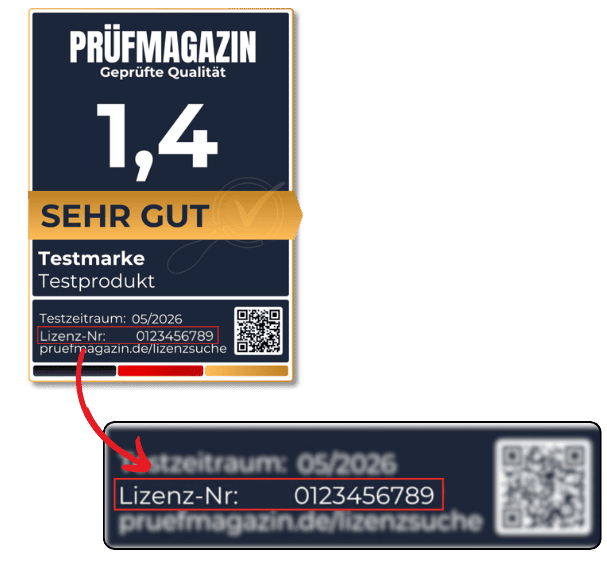
Where to look Where is the licence number?
- At the bottom of the seal, directly above the web address.
- It consists of digits, sometimes with an additional hyphen.
- On printed seals, the QR code leads straight to this check.
Helpful answers
Frequently asked questions about the licence number
Where to find the number, what a failed match means and how to report a suspicious seal.
01 No match — what does that mean?
In most cases two digits have been swapped — compare the number with the seal once more. If it still leads to no report, drop us a line. We will gladly clear it up for you.
02 The seal has no number at all.
Every Prüfmagazin seal carries a licence number — it is the key to the test report. Without it, the result cannot be looked up. In that case, send us a photo or the link to the listing: we will take a look.
03 The number leads to a different product.
There are two possible causes. Usually a digit has been swapped and the number leads to another product that has also been tested — comparing it with the seal settles this. If the number is correct, it is being used on a product it was not issued for. Let us know — that is how we keep the link between seal and report reliable.